Guide · 3 steps · under a minute
How to connect an MCP server
Extend Claude with new tools and data sources. Paste one URL into Claude.ai or Claude Desktop and Claude can pull from GOV.UK, Companies House, the Land Registry, Rightmove, Primavera P6, and more.
- 1
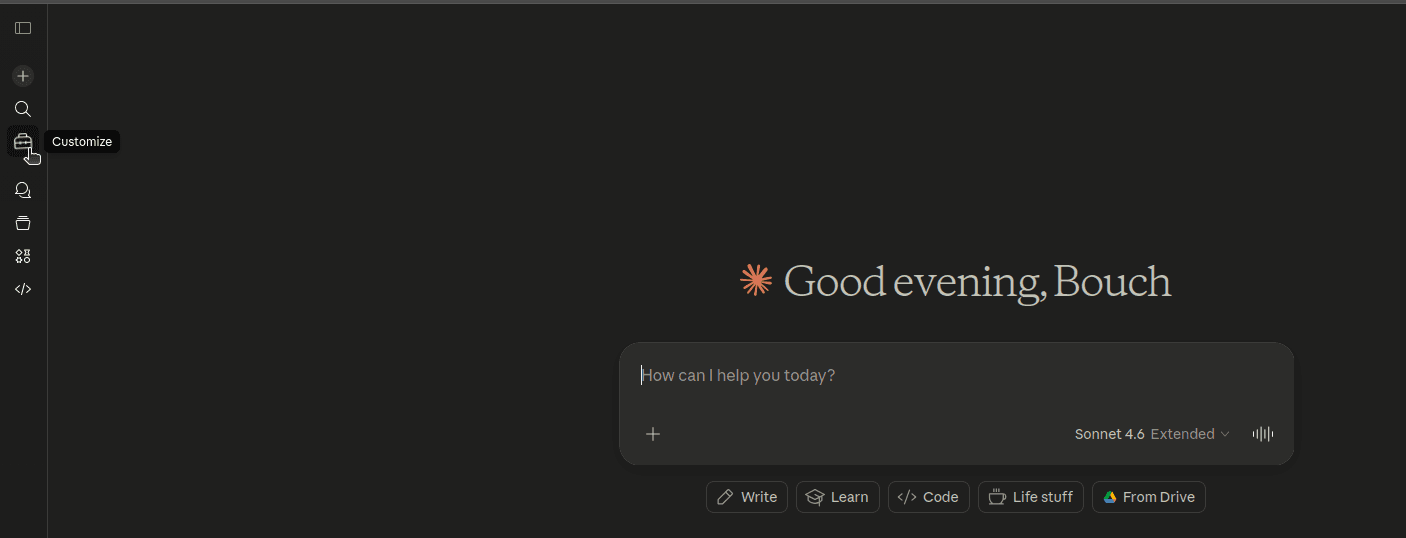
Open the Customise menu
In Claude.ai or Claude Desktop, find the Customise icon on the left panel.
- 2
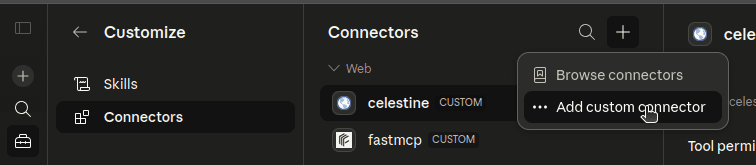
Add a new connector
Click Connectors, then the + button, and select Add custom connector.
- 3
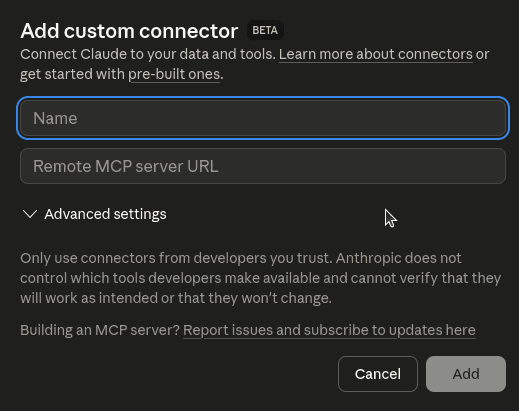
Enter the server URL
Give the server any name you like, then paste the URL exactly as provided below. Click Add and you’re done.
Step 3 · the URL
BOUCH MCP server URLs
You only need the server(s) relevant to your work. Each one gives Claude access to a different set of tools — start with one, add more later.
- UK Business (All-in-One)
Companies House, due diligence, property, planning, VAT.
https://uk-business-mcp.fly.dev/mcp - UK Legal
Case law (TNA Find Case Law), legislation, Hansard, Members, HMRC, OSCOLA citations.
https://uk-legal-mcp.fly.dev/mcp - UK Due Diligence
Companies House, Charity Commission, HMLR title register, The Gazette, VAT validation.
https://uk-due-diligence-mcp.fly.dev/mcp - UK Property
Land Registry comps, EPC, Rightmove, rental yields, stamp duty, Companies House.
https://property-shared.fly.dev/mcp - UK Property Data
Focused UK property data — comps, EPC, yields.
https://uk-property-mcp.fly.dev/mcp - Property Descriptions
Listing-description generation.
https://property-descriptions-mcp.fly.dev/mcp - GOV.UK
GOV.UK search, content drill-down, organisations, postcode → local authority.
https://govuk-mcp.fly.dev/mcp - WhatDoTheyKnow
FOI requests — public JSON, Atom feeds, CSV exports, request lifecycle.
https://whatdotheyknow-mcp.fly.dev/mcp - Pine Script v6
Pine Script v6 documentation lookup, function validation, and linting.
https://pinescript-mcp.fly.dev/mcp
Stuck? Want one built for your workflow?
Custom MCP servers for your tools, data, and team are part of what BOUCH builds. Send a note and we’ll show you what fits.